
Notified by Email
Tascord × E-mail: notifications directly in your inbox
With Tascord email notifications, your important tasks and to-dos always await you in your inbox. There's no need to open a separate application, as task management seamlessly integrates into your accustomed email account, where you check your messages multiple times a day anyway. This ensures your to-dos remain visible and easily manageable.
Important note: The delivery of email notifications is not always guaranteed to be instantaneous. The timing of the notification may vary from the time of sending, so it's possible that the to-do may reach you late. Therefore, for critical, deadline-sensitive tasks, it is always advisable to use another tool that provides instant notification.
Why use email notifications?
Email notifications are excellent for keeping tasks and to-dos continuously in your focus, without having to adapt to new interfaces. This is particularly useful if:
- You check your emails daily, ensuring important to-dos are not forgotten.
- You want to see all your tasks in one place, organized alongside your work and personal emails.
- You want to form new habits, and the continuous visual presence of your to-dos supports this.
How does it help in forming habits?
The successful formation of habits and routines often depends on how often you encounter tasks. Email notifications provide support in this daily reinforcement:
- You receive regular reminders about important tasks, making the action easier to become a routine.
- To-dos come to mind multiple times a day, keeping your attention focused.
- Real-life examples:
- Important administrative tasks or bills that you need to handle regularly.
- Household chores, such as organizing shopping or housework.
- Health and lifestyle goals: tracking daily water intake, regular exercise, medication or vitamin intake reminders.
Postponable tasks
When Tascord sends an email about an upcoming task, you don't have to deal with it immediately. With the help of links or buttons in the email, you can easily postpone the to-do to a later time, allowing you to flexibly manage your daily schedule without forgetting the task.
Mandatory tasks
For weekly or monthly recurring, mandatory tasks, you also receive an email notification. In such cases, you can mark the task as completed with a single click on the Tascord interface, directly from the email. This ensures that tasks become organized and nothing remains undone.
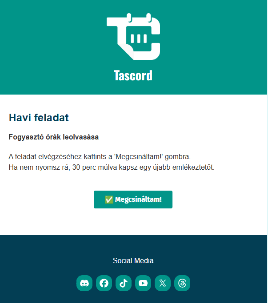
Why use Tascord email notifications?
Tascord's email notification function offers numerous advantages that contribute to more effective time management and a less stressful daily life:
- You can see all tasks and to-dos in one place, in your central email inbox.
- Helps in forming consistent habits and adhering to your daily routine.
- Simple and quick access through your accustomed inbox.
- Notifications can be easily postponed or completed, allowing you to flexibly manage your to-dos.
You might also like
Notified on Discord
Get task and habit reminders straight to your Discord DMs. Complete or manage tasks directly in Discord, just as you would anywhere else.
Read moreTodo task
Create a one-time to-do with a set reminder. Get notified once, or snooze it for later. You can even create to-dos with a simple Discord command.
Read moreWeekly task
Schedule a weekly task for any day of the week. If you don’t complete it, Tascord reminds you every 30 minutes until it’s done or the day ends.
Read moreMonthly task
Schedule a monthly task for any day of the month. If you don’t complete it, Tascord reminds you every 30 minutes until it’s done or the day ends.
Read more