
Notified on Discord
Tascord × Discord: notifications directly in private message
When you connect Tascord to your Discord account, the system automatically sends notifications for all important tasks directly in a private message. This eliminates the need to open a separate app, as your tasks await you where you already spend most of your time, ensuring continuous information and efficient task management.
When is it worth using Discord notifications?
Using Discord notifications is particularly recommended in the following cases:
- Discord is always at hand (on desktop or mobile), so you can immediately be informed about tasks.
- You react instantly to a ping, vibration, or notice the red notification dot, avoiding the loss of important messages amidst other notifications.
- You want tasks not to get lost in a sea of other applications, but to be accessible and manageable in a central location.
TIP: Form habits easily! You can integrate new routines into your daily life most simply by displaying tasks where you will notice them anyway. For example: place vitamins where you pass them multiple times a day; always keep a water bottle on your desk if you want to drink more water; prepare your workout gear on the sofa in advance so it cannot be "unnoticed"; put your phone in another room when you are working if you want to save on screen time; place a book next to your bed to pick it up before going to sleep if you want to read more.
Notifying postponable tasks
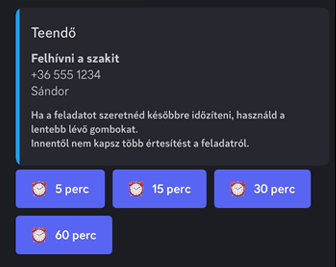
When Tascord sends a notification about an upcoming task, you don't have to deal with it immediately. With the buttons available in the private message, you can easily postpone the task to a later time, allowing you to flexibly manage your daily priorities.
Notifying mandatory tasks
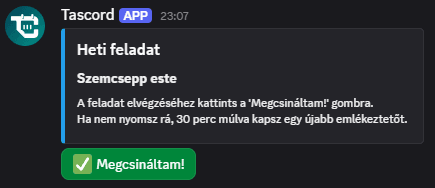
Discord notifications are also sent for weekly or monthly recurring, mandatory tasks. In such cases, you can mark the task as completed with a single click using the I'm done button, quickly and easily documenting its completion.
Why use Tascord and Discord integration?
Tascord and Discord integration offers numerous advantages that contribute to more effective time management and a less stressful daily life:
- You won't miss anything: Thanks to direct notifications, you will always be up-to-date with your tasks.
- Task management happens on your familiar platform: You don't have to adapt to a new interface; Tascord is also available via Discord.
- Simple, fast, and convenient: Intuitive buttons and private messages make task management seamless and time-saving.
You might also like
Notified by Email
Get task and habit reminders straight to your inbox. Complete or postpone tasks directly from your email.
Read moreTodo task
Create a one-time to-do with a set reminder. Get notified once, or snooze it for later. You can even create to-dos with a simple Discord command.
Read moreWeekly task
Schedule a weekly task for any day of the week. If you don’t complete it, Tascord reminds you every 30 minutes until it’s done or the day ends.
Read moreMonthly task
Schedule a monthly task for any day of the month. If you don’t complete it, Tascord reminds you every 30 minutes until it’s done or the day ends.
Read more