
Weekly task
Weekly Tasks in Tascord
Weekly tasks in Tascord represent a more advanced form of digital reminders, specifically designed for managing regularly recurring tasks. These tasks ensure that important, weekly to-dos are never forgotten, as Tascord automatically reminds you at the specified times. The system sends a notification every 30 minutes from the set time until the end of the day, until you complete the task.
Important distinction: Unlike one-time tasks, weekly tasks cannot be postponed. Notifications continuously signal the task until it is completed, or until it is rescheduled for the next week at the end of the day. This feature guarantees that weekly routines run smoothly and tasks are not missed.
When is it worth using weekly tasks in Tascord?
Weekly tasks in Tascord are most useful when it comes to recurring tasks that you need to perform week after week, on certain days of the week. These tasks often fall victim to the daily rush, but with Tascord's help, they can be easily integrated into your routine, ensuring that nothing important is forgotten.
Real-life examples when it's worth using weekly tasks:
- Household chores: Taking out the trash, grocery shopping, laundry, cleaning on certain days. Weekly tasks help the household run smoothly, reducing stress caused by forgetfulness.
- Health and lifestyle: Weekly sports training, weighing, planned meals or vitamin intake. Tascord's weekly task function also provides great help in developing healthy habits, supporting a conscious lifestyle.
- Learning and development: Weekly reading goals, courses, or practical assignments. Consistency is essential for maintaining regular learning and self-development, which you can easily achieve with weekly tasks.
- Workplace routine tasks: Preparing weekly reports, processing emails, preparing for team meetings, or project updates. Tascord ensures that these tasks are always completed on time, contributing to workplace efficiency.
TIP: With weekly tasks, you set a task once, and then the system reminds you weekly, so you don't have to worry every week about what you've forgotten. Free your mind from unnecessary mental lists, and let Tascord take care of regular reminders, increasing your concentration on other important things.
How do weekly tasks work in Tascord?
Tascord's weekly task function offers numerous options for efficient management of regular tasks, optimizing the user experience:
- Notification: The system reminds you of the task every half hour until you mark it as completed. This continuous reminder minimizes the chance of forgetting important tasks and helps in completing tasks on time.
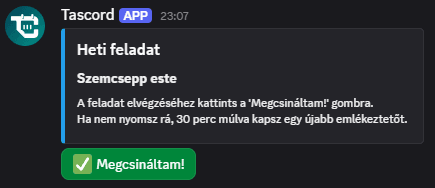
- "I'm done" button: Every notification contains a single button: I'm done. With one click, you can mark the task as completed, allowing you to manage your tasks quickly and easily, without having to navigate to the Tascord interface.
- Setting days of the week: When creating, you can set which days you want to receive notifications, so the task only alerts you on relevant days. This flexibility allows you to tailor Tascord precisely to your routine and avoid unnecessary notifications.
- Automatic scheduling: If you do not mark the task as completed even after 11:30 PM, the system automatically reschedules the task for the next week. This feature ensures that no task is lost, even if it could not be completed on the given day, thus guaranteeing continuous tracking of tasks.
Tips for effective use of weekly tasks:
- Establishing a routine: Set the days for tasks in advance to make it easier to establish a routine. If you receive a reminder on the same day every week, your brain will automatically associate the task with the routine, helping to reinforce habits.
- Overcoming procrastination: If you tend to procrastinate on a task, choose a fixed day and time for it during the week, so it becomes a natural part of your routine. This helps in overcoming procrastination and completing tasks on time.
- Friendly reminder: Consciously use the half-hourly notifications: let them remind you multiple times until the task is completed, but don't stress about them; consider them a friendly reminder. These reminders are there to help you, not to burden you, and serve stress-free task management.
Weekly tasks on Discord
It is important to note that, unlike one-time and monthly tasks, weekly tasks cannot be created on Discord. You will receive and can manage notifications on Discord, but you cannot list, delete, or create them.
Weekly tasks via Email
Depending on your settings, you can also receive notifications via email, where you can mark the task as completed with the help of a button. This feature offers a convenient alternative for those who prefer email-based notifications and provides quick access to update the status of tasks.
Why is it worth using weekly tasks?
Tascord's weekly task function offers numerous advantages that contribute to more effective time management and a less stressful daily life. These benefits are key to increasing productivity and smoothly managing tasks:
- No important weekly task is ever missed: The system supports you with continuous reminders, so you can be sure that all important tasks are completed, reducing the risk of forgetfulness.
- Time efficiency: The half-hourly reminder helps ensure that the task doesn't get lost among daily duties and is completed on time, optimizing workflows.
- Routine building: Weekly scheduling contributes to the development of regular habits, which in the long run increases productivity and helps in more disciplined work.
- Automatic tracking: Uncompleted tasks are automatically rolled over to the next week, so you don't have to manually reschedule them, saving time and energy, and ensuring continuous tracking of tasks.
- Simple management: Creation and notification management are easily transparent on the Tascord interface; everything is in one place, making the user experience seamless and intuitive.
You might also like
Notified on Discord
Get task and habit reminders straight to your Discord DMs. Complete or manage tasks directly in Discord, just as you would anywhere else.
Read moreNotified by Email
Get task and habit reminders straight to your inbox. Complete or postpone tasks directly from your email.
Read moreTodo task
Create a one-time to-do with a set reminder. Get notified once, or snooze it for later. You can even create to-dos with a simple Discord command.
Read moreMonthly task
Schedule a monthly task for any day of the month. If you don’t complete it, Tascord reminds you every 30 minutes until it’s done or the day ends.
Read more